
Reliability Week 2025 takes place June 16 - 18
What is Reliability Week?
Reliability Week is our internal, virtual conference — designed by engineers, for engineers — to strengthen our systems and reduce critical incidents.
This week is packed with chaos testing, hands-on workshops, and tech talks, all driven by our BRAVE principles. It’s a chance for every engineer to pick up practical tools and fresh ideas that can make an immediate impact.
Let’s build stronger systems, together!
How do I participate?
You'll receive calendar invites for each session, which will broadcast from the Reliability Week Zoom Events platform. Sign into Zoom Event is required.
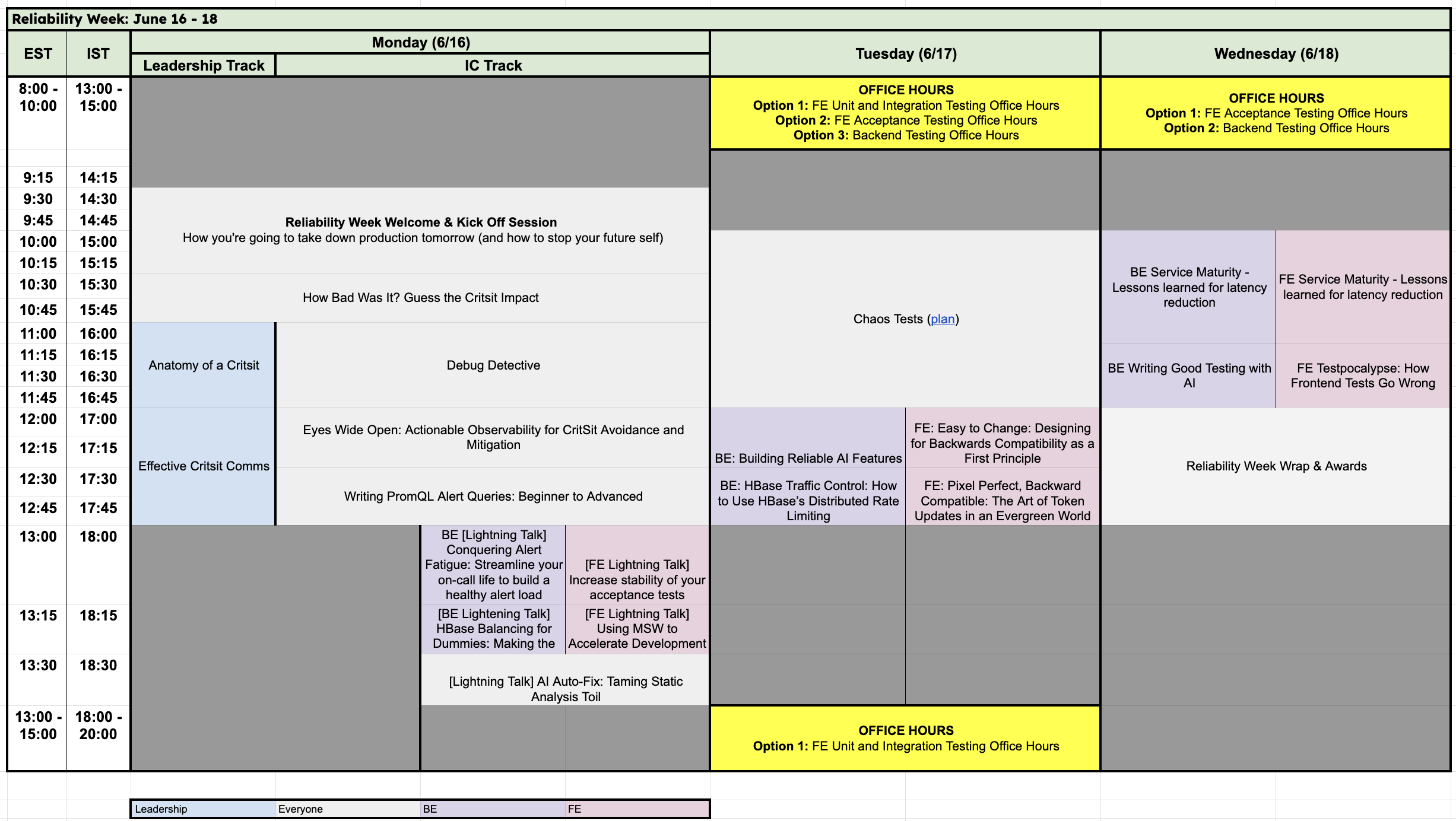
All talks will stream live between 9.30am–1pm EST, with replays available approximately 30 minutes after each session ends on the event hub.
We understand this timing may not suit everyone, but it allows us to offer the most inclusive schedule across global time zones.
What are the work expectations of Reliability Week?
Participating in Reliability Week is essential for all engineers in the Product Org. The sessions are fully remote and take up half of your workday. All Product engineers are expected to attend. Please check in with your manager to align on priorities for that week, and to create bandwidth to attend. Exceptions made for folx on call or involved in a Critsit.
Who is Reliability Week for?
Reliability Week is for all engineers in the Product Org.
What are the working expectations for Reliability Week?
Participating in Reliability Week is essential for all engineers in the Product Org. The sessions are fully remote and take up half of your workday. All Product engineers are expected to attend. Please check in with your manager to align on priorities for that week, and to create bandwidth to attend. Exceptions made for folx on call or involved in a Critsit.
How do I add sessions to my calendar?
You'll receive calendar invites for each session which will broadcast from the the Reliability Week Zoom Events platform.
Will sessions be recored?
Yes, all talks will be available on Zoom Events replay approximately 60 minutes after each session ends.
Is attendance at Reliability Week mandatory?
Yes, participating in Reliability Week is essential for all engineers in the Product Org.
Can I attend in person?
Reliability Week is a fully remote event. With the option to join the watch parties hosted parties hosted in Dublin and CAM.
I'm having issues accessing Zoom Event.
|
The link in the calendar invite isn’t working. |
|
A: Ensure you're logged into your HubSpot Zoom account. |
|
How do I navigate to a certain session? |
|
A: To find individual sessions, select “Sessions” in the top navigation bar. |
|
I'm having trouble logging into the event, who can I contact? |
|
A: Please reach out to us at #pex-support tagging Clodagh O'Hagan & Michael Martin |
|
What are the different parts of the Zoom Event platform? |
|
A: The Zoom Event platform includes: - Lobby: The event homepage with featured speakers and events. - Sessions: A list of Reliability Week events. - Itinerary: A calendar view of events that you have bookmarked (optional). - Speakers: A list of Reliability Week speakers. |
|
Where can I see the speaker information? |
|
A: Speaker information is available in the “Speaker” section of the top navigation bar. |
|
Will there be recordings of the sessions? How can I access them later? |
|
A: Session recordings will be available on the Reliability Week hub 30mins later and on the Reliability Website post event. |
|
I'm experiencing lag or disconnections. |
|
A: Check your internet connection and close any applications using excessive bandwidth |
|
I can't join the event from my mobile device. |
|
A: Some features may not be supported on mobile. Use a desktop browser or the Zoom desktop client for full functionality. |
If you can't find your answer, contact #pex-support for urgent issues or submit a ticket to PEX for other questions.